
Belajar Python API Request Requests Library
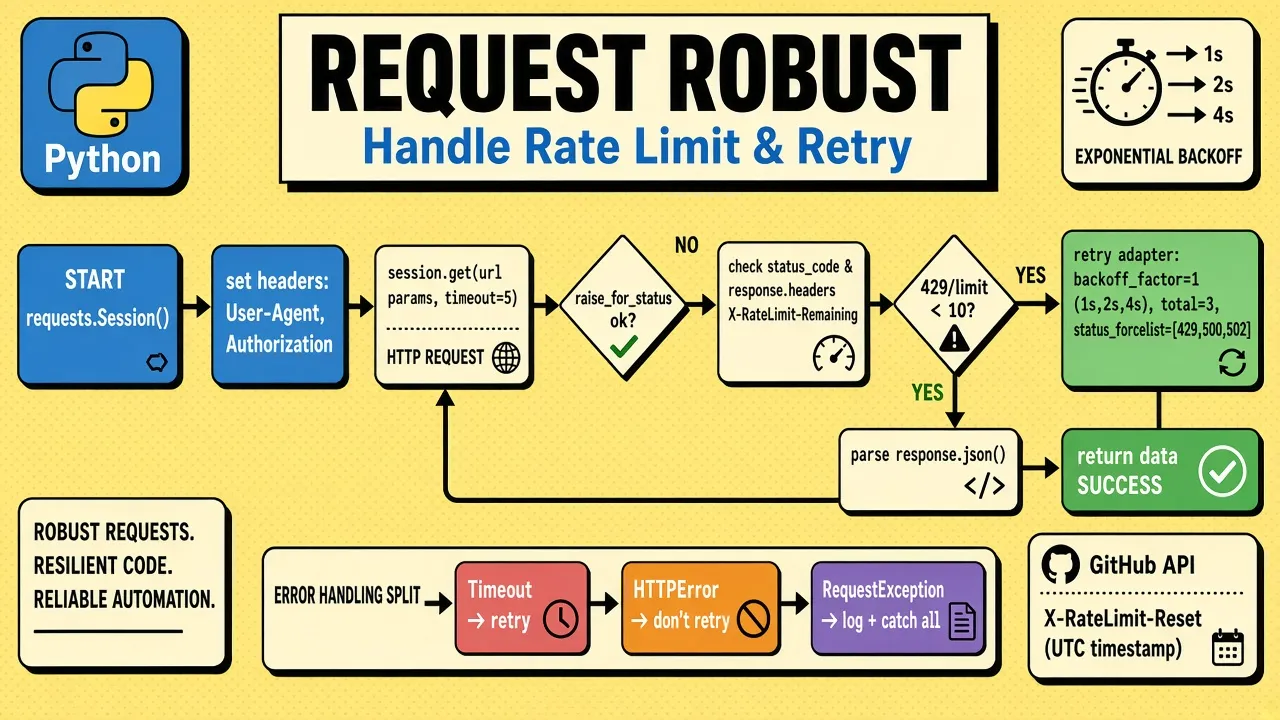
library requests adalah alat yang hampir selalu saya pakai saat berurusan dengan API, dari mengambil data publik sampai mengirim data ke layanan pihak ketiga. di 2026, requests versi 2.31+ masih jadi standar sync, tapi banyak project baru sudah pakai httpx yang support sync dan async sekaligus. panduan ini mencakup GET, POST, JSON, file upload, pagination, sampai retry, yang merupakan 90% kebutuhan sehari-hari. kalau baru mulai, pastikan paham dulu error handling try except karena API call sering throw exception, dan pip dan virtual environment untuk install yang benar.
1. install requests
pip install requests
verifikasi:
import requests
print(requests.__version__)
2. GET request dasar
import requests

response = requests.get("https://api.github.com/users/octocat")
print(response.status_code)  # 200
data = response.json()
print(data["login"])
penjelasan per baris:
import requests: load library.requests.get(url): kirim GET request. return object Response.response.status_code: kode HTTP (200 sukses, 404 not found, 500 server error, dst).response.json(): parse response body sebagai JSON jadi dict Python. otomatis cek Content-Type.data["login"]: akses field hasil parse. kalau bukan dict, raise ValueError.
3. query parameters
params = {"q": "python", "page": 1, "per_page": 10}
response = requests.get("https://api.github.com/search/repositories", params=params)
print(response.url)  # otomatis: ...?q=python&page=1&per_page=10
params otomatis di-encode jadi query string. tidak perlu urlencode manual. lebih aman dari string concatenation (menghindari injection).
4. POST request
data = {"title": "Foo", "body": "Bar"}
response = requests.post("https://jsonplaceholder.typicode.com/posts", json=data)
print(response.json()["id"])  # 101
json=data otomatis serialize dict ke JSON dan set Content-Type: application/json. alternatif: data=data untuk form-encoded (application/x-www-form-urlencoded).
5. headers dan authentication
headers = {
    "Authorization": "Bearer ghp_xxxxxxxxxxxx",
    "Accept": "application/json",
    "User-Agent": "MyApp/1.0"
}
response = requests.get("https://api.github.com/user", headers=headers)
penjelasan header penting:
Authorization: bearer token, API key, atau basic auth. tanpa ini, API protected akan return 401.Accept: kasih tau server format response yang kamu mau. kalau tidak support, server bisa return 406.User-Agent: identifikasi app kamu. banyak API publik (GitHub, Twitter) yang block request tanpa User-Agent.
6. error handling
try:
    response = requests.get("https://api.example.com/data", timeout=5)
    response.raise_for_status()  # raise exception kalau 4xx/5xx
    data = response.json()
except requests.exceptions.Timeout:
    print("Request timeout, coba lagi")
except requests.exceptions.HTTPError as e:
    print(f"HTTP error: {e} – status {e.response.status_code}")
except requests.exceptions.ConnectionError:
    print("Gagal konek, cek internet/DNS")
except requests.exceptions.JSONDecodeError:
    print("Response bukan JSON valid, cek response.text")
except requests.exceptions.RequestException as e:
    print(f"Error lain: {e}")
penjelasan:
timeout=5atautimeout=(3, 10): batas waktu tunggu.timeout=5= 5 detik untuk connect + read.timeout=(3, 10)= 3 detik connect, 10 detik read, lebih presisi untuk production. wajib agar request tidak hang selamanya (default requests tanpa timeout).raise_for_status(): otomatis raiseHTTPErrorkalau status 4xx/5xx. tanpa ini, kamu harus manual cekif response.status_code != 200.Timeout: exception spesifik untuk timeout (subclass dari RequestException).HTTPError: dari raise_for_status(), bawae.response.status_codedane.response.text.ConnectionError: DNS gagal, refused, network putus.JSONDecodeError: kalauresponse.json()gagal karena body bukan JSON (misal HTML error page).RequestException: parent class, catch semua error requests. taruh paling bawah.
7. PUT, PATCH, DELETE
# Update
requests.put("https://api.example.com/posts/1", json={"title": "Baru"})

# Partial update
requests.patch("https://api.example.com/posts/1", json={"title": "Patch"})

# Delete
requests.delete("https://api.example.com/posts/1")
PUT ganti seluruh resource, PATCH update sebagian field, DELETE hapus. banyak REST API modern hanya pakai PATCH + DELETE.
8. Session untuk banyak request
kalau hit API yang sama 10+ kali, pakai Session untuk connection reuse:
session = requests.Session()
session.headers.update({"Authorization": "Bearer token"})

# Pakai session
r1 = session.get("https://api.example.com/users/1")
r2 = session.get("https://api.example.com/users/2")
r3 = session.get("https://api.example.com/users/3")

# Set auth untuk semua request
session.auth = ("user", "pass")

# Tutup session
session.close()
keuntungan Session:
- TCP connection reuse (HTTP keep-alive) : 2-3x lebih cepet untuk banyak request.
- cookies persist antar request.
- default headers di-apply ke semua request.
- auth persistent : tidak perlu set di setiap call.
alternatif: pakai with statement:
with requests.Session() as session:
    session.headers["Authorization"] = "Bearer token"
    r = session.get("https://api.example.com/users")
9. retry dengan exponential backoff
untuk API yang sering rate-limit, pakai retry adapter:
from requests.adapters import HTTPAdapter
from requests.packages.urllib3.util.retry import Retry

retry_strategy = Retry(
    total=3,                              # max 3 retry
    status_forcelist=[429, 500, 502, 503, 504],  # retry hanya untuk status ini
    backoff_factor=1,                     # wait 1, 2, 4 detik
    allowed_methods=["GET", "POST"]      # method yang boleh di-retry (ganti method_whitelist yang deprecated sejak urllib3 1.26)
)

adapter = HTTPAdapter(max_retries=retry_strategy)
session = requests.Session()
session.mount("https://", adapter)
session.mount("http://", adapter)

# Sekarang semua request auto-retry kalau dapat 429/5xx
response = session.get("https://api.example.com/data")
10. file upload
# Single file – jangan lupa tutup file, pakai with biar aman
with open("report.pdf", "rb") as f:
    files = {"file": f}
    response = requests.post("https://api.example.com/upload", files=files)

# Dengan nama file custom + mime type
with open("report.pdf", "rb") as f:
    files = {"file": ("nama-baru.pdf", f, "application/pdf")}
    response = requests.post("https://api.example.com/upload", files=files)

# Kirim file + data form sekaligus
with open("report.pdf", "rb") as f:
    files = {"file": ("report.pdf", f)}
    data = {"keterangan": "laporan mingguan"}
    response = requests.post("https://api.example.com/upload", files=files, data=data)

# Multi file (key sama)
files = [
    ("files", ("a.txt", open("a.txt", "rb"), "text/plain")),
    ("files", ("b.txt", open("b.txt", "rb"), "text/plain")),
]
response = requests.post("https://api.example.com/upload-multi", files=files)
selalu pakai with open(..., "rb") biar file otomatis tertutup. untuk upload besar, set timeout lebih lama.
11. download file besar (stream)
# Biasa (download semua ke memory dulu)
response = requests.get("https://example.com/large-file.zip")
with open("file.zip", "wb") as f:
    f.write(response.content)  # boros memory

# Stream (download chunk by chunk)
response = requests.get("https://example.com/large-file.zip", stream=True)
with open("file.zip", "wb") as f:
    for chunk in response.iter_content(chunk_size=8192):
        f.write(chunk)
iter_content(8192) download 8KB per chunk. memory konstan walaupun file 1GB.
12. SSL verification
# Default: verify=True (aman, cek sertifikat SSL)
response = requests.get("https://api.example.com/data")

# Disable (JANGAN di production, hanya untuk testing)
response = requests.get("https://self-signed.example.com", verify=False)

# Custom CA bundle
response = requests.get("https://internal.example.com", verify="/path/to/ca-bundle.crt")
warning: verify=False bikin request rentan MITM attack. hanya untuk development atau test environment.
13. async requests (concurrent)
requests synchronous, jadi untuk concurrent call, pakai ThreadPoolExecutor:
import requests
from concurrent.futures import ThreadPoolExecutor

urls = [
    "https://api.example.com/users/1",
    "https://api.example.com/users/2",
    "https://api.example.com/users/3",
    "https://api.example.com/users/4",
]

def fetch(url):
    return requests.get(url, timeout=5).json()

with ThreadPoolExecutor(max_workers=4) as executor:
    results = list(executor.map(fetch, urls))

print(results)
untuk true async (lebih cepet untuk 100+ request), pakai library seperti httpx atau aiohttp.
14. studi kasus: ambil data GitHub user
contoh nyata pakai requests untuk scrape API publik GitHub:
import requests
from requests.adapters import HTTPAdapter
from requests.packages.urllib3.util.retry import Retry

def get_github_user(username, token=None):
    session = requests.Session()

    # Auto-retry untuk network error
    retry = Retry(total=3, backoff_factor=1, status_forcelist=[429, 500, 502, 503, 504])
    session.mount("https://", HTTPAdapter(max_retries=retry))

    headers = {"Accept": "application/vnd.github.v3+json"}
    if token:
        headers["Authorization"] = f"token {token}"

    try:
        response = session.get(
            f"https://api.github.com/users/{username}",
            headers=headers,
            timeout=10
        )
        response.raise_for_status()
        user = response.json()

        # Cek rate limit
        remaining = response.headers.get("X-RateLimit-Remaining")
        if remaining and int(remaining) < 10:
            print(f"Warning: rate limit tinggal {remaining}")

        return {
            "username": user["login"],
            "name": user.get("name"),
            "bio": user.get("bio"),
            "public_repos": user["public_repos"],
            "followers": user["followers"],
            "url": user["html_url"],
        }
    except requests.exceptions.RequestException as e:
        print(f"Error: {e}")
        return None

# Pakai
user = get_github_user("octocat", token="ghp_xxx")
if user:
    print(f"{user['name']} ({user['username']}) - {user['public_repos']} repos")
15. auth, cookies, proxy, dan response detail
selain yang di atas, ini yang sering dibutuhkan di production:
# Basic Auth
from requests.auth import HTTPBasicAuth
requests.get("https://api.example.com/private", auth=HTTPBasicAuth("user", "pass"))
requests.get("https://api.example.com/private", auth=("user", "pass"))  # shortcut

# Bearer sudah di headers, contoh di bab 5

# Cookies otomatis via Session
session = requests.Session()
session.get("https://example.com/login", data={"user": "andi"})
print(session.cookies.get_dict())  # cookies persist di session
session.get("https://example.com/dashboard")  # otomatis kirim cookies

# Akses cookies dari response
r = requests.get("https://httpbin.org/cookies/set?name=andi")
print(r.cookies["name"])

# Proxy (kantor, scraper)
proxies = {"http": "http://proxy:8080", "https": "http://proxy:8080"}
requests.get("https://api.example.com/data", proxies=proxies, timeout=10)

# Response detail
r = requests.get("https://api.example.com/data")
print(r.status_code)        # 200
print(r.headers["Content-Type"])  # application/json
print(r.text[:200])         # body sebagai string
print(r.content[:200])      # body sebagai bytes
print(r.json())             # body sebagai dict (raise jika bukan JSON)
print(r.url)                # URL final setelah redirect
print(r.elapsed.total_seconds())  # durasi request

# Timeout tuple (connect, read)
requests.get("https://api.example.com/data", timeout=(3, 10))
16. pagination dan rate limit
API biasanya batasi 30-100 item per halaman. cek header Link atau field next:
url = "https://api.github.com/users/octocat/repos?per_page=100"
while url:
    r = requests.get(url, headers={"Accept": "application/vnd.github.v3+json"}, timeout=10)
    r.raise_for_status()
    for repo in r.json():
        print(repo["full_name"])
    # GitHub pakai header Link: <url>; rel="next"
    url = r.links.get("next", {}).get("url")  # None kalau halaman terakhir
    # rate limit GitHub: cek header
    if int(r.headers.get("X-RateLimit-Remaining", 1)) == 0:
        reset = int(r.headers.get("X-RateLimit-Reset", 0))
        import time; time.sleep(max(0, reset - time.time()))
17. tips produksi
- selalu set timeout :
timeout=5atautimeout=(3, 10), tanpa timeout requests hang selamanya (default None). - pakai Session untuk 5+ request ke host yang sama : 2-3x lebih cepet via TCP keep-alive.
- handle rate limit dengan auto-retry + exponential backoff (
Retrydenganstatus_forcelist+allowed_methods), dan hormatiRetry-AftersertaX-RateLimit-Remaining. - log request untuk debugging:
response.request.url,response.request.headers,response.elapsed. - validasi response dengan
raise_for_status()daripada manual cek status_code, plus cekresponse.headers["Content-Type"]sebelumresponse.json(). - pakai env var untuk token:
os.getenv("GITHUB_TOKEN"), jangan hardcode. load viapython-dotenv. - pakai
with openuntuk files biar tidak bocor file descriptor. - cache response untuk data yang jarang berubah: simpan ke file atau Redis, pakai
ETag/If-None-Matchkalau API support. - test dengan mock pakai
responsesataupytest-responses(Python unit testing), jangan hit API asli di CI. - untuk async/parallel pakai
httpx(drop-in sync+async,httpx.get()mirip requests) atauaiohttp(true async, butuhasync/await). - monitor di production dengan logger atau APM (Sentry, DataDog), dan set
User-Agentyang jelas.
Kesimpulan
- install:
pip install requests: paling populer, paling stabil - GET/POST/PUT/PATCH/DELETE : semua HTTP method tersedia
paramsuntuk query string, otomatis di-encodeheadersuntuk auth dan custom headertimeoutwajib untuk productionraise_for_status()untuk auto-error handling- Session untuk banyak request ke host yang sama (lebih cepet)
- Retry adapter untuk handle rate limit
stream=Trueuntuk download file besar- untuk async/parallel, pakai
httpxatauaiohttp
Baca Juga Mengenai :
Pertanyaan yang Sering Diajukan
Apa itu library requests di Python?
requests adalah HTTP library paling populer di Python. dipakai untuk memanggil API eksternal, download file, submit form, dan komunikasi client-server. lebih simpel dari urllib bawaan. install: pip install requests.
Bagaimana cara kirim GET request dengan query parameter?
pakai parameter params=dict. contoh: requests.get(url, params={"q": "python", "page": 1}). otomatis di-encode jadi ?q=python&page=1. tidak perlu manual urlencode.
Beda response.text dan response.json() apa?
response.text = string raw dari server. response.json() = parsed ke dict/list Python (otomatis parse JSON). pakai .json() kalau Content-Type application/json. pakai .text kalau HTML atau plain text.
Apa itu raise_for_status() di requests?
method yang otomatis raise HTTPError kalau status_code 4xx atau 5xx. tanpa ini, kamu harus manual cek status_code. best practice pakai try-except di sekelilingnya.
Bagaimana cara set timeout di requests?
pakai parameter timeout dalam detik. contoh: requests.get(url, timeout=5). tanpa timeout, request bisa hang selamanya kalau server tidak respond. best practice selalu set timeout.
Beda Session dan requests langsung apa?
Session pakai TCP connection reuse (HTTP keep-alive) untuk banyak request ke host yang sama. lebih cepet untuk 10+ request. juga otomatis simpan cookies antar request. pakai untuk API call berulang.
Bagaimana cara upload file dengan requests?
pakai parameter files=dict. contoh: requests.post(url, files={"file": open("doc.pdf", "rb")}). bisa juga multi-file: files={"file1": ..., "file2": ...}. otomatis set Content-Type multipart/form-data.
Bagaimana cara handle API rate limit?
cek response header X-RateLimit-Remaining. kalau 0, tunggu sesuai X-RateLimit-Reset. atau pakai library retry seperti requests.Session dengan adapter HTTP untuk auto-retry dengan exponential backoff.